

Database Event
In the admin: Workflows › a Workflow › Settings › Trigger
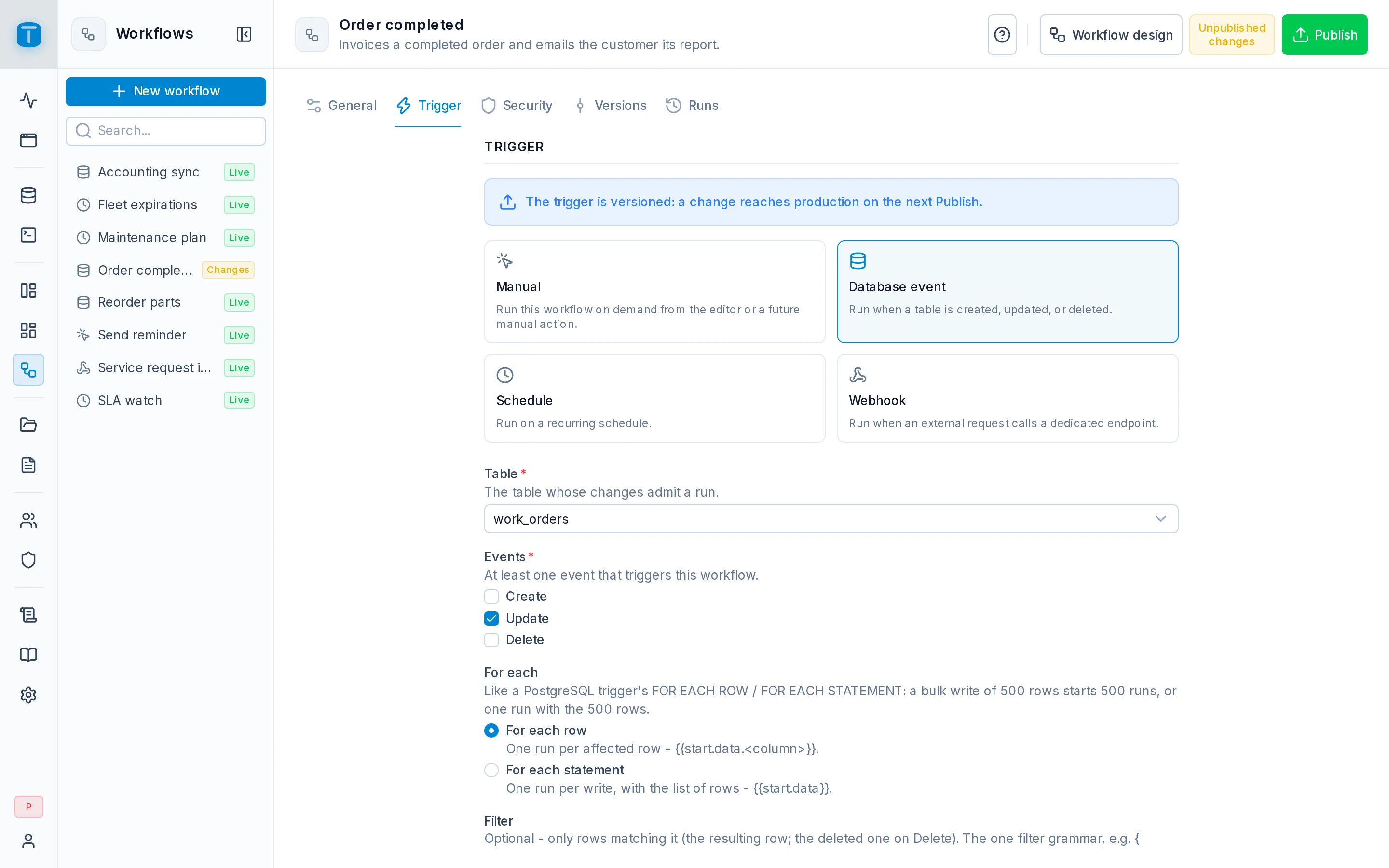
A Database event workflow runs when rows of a table change. Acme's Order completed runs when a work order's status becomes COMPLETED: it creates the invoice, renders the work order as a PDF and emails it to the customer.
Configuration
| Field | |
|---|---|
| Table | Required. An ACTIVE table. Views and functions emit no events |
| Events | Required, at least one: Create, Update, Delete |
| For each | For each row (the default): one run per affected row, which it reads as {{start.data.<column>}}. For each statement: one run per write, with the list of its rows in {{start.data}} |
| Filter | Optional. Only rows matching it: the resulting row, or the deleted one on Delete |
| Changed fields | Optional, Update only. Runs only when one of these columns changed |
| Filter on the row before | Optional, Update only. The row before the write must match it |
| Execute as | Required. The account every run executes as. The editor proposes the Workflows system account |
For each follows PostgreSQL's own trigger choice, FOR EACH ROW or FOR EACH STATEMENT: a bulk write of 500 rows starts 500 runs, or one run with the 500 rows. Pick For each statement for work done once per write, such as a summary: 500 products imported.
The filters are written as JSON in the filter grammar the Data API and row filters use. They're evaluated over the whole row; $USER.* and $PERIOD.* can't be used, since there's no user to resolve them against.
Order completed uses all three to run exactly on the transition to completed, and not again if a completed order is edited later:
| Field | Value |
|---|---|
| Events | Update |
| Filter | {"status": {"_eq": "COMPLETED"}} |
| Changed fields | status |
| Filter on the row before | {"status": {"_neq": "COMPLETED"}} |
Execute as is the account the run acts as, not the person who made the change. The technician who closed the order can't write invoices; the workflow can, because it executes as the Workflows system account. The person is still recorded: their write's audit entry, and the run's initiator.
Which writes are events
An event is recorded by every write made through TotalBase: the Data API, DataViews, pages of the App, imports, and workflow steps that opt in (below). It's stored in the same transaction as the write and its audit entry, and handed to workflows after the commit. A write that rolls back starts nothing.
These produce no events:
- SQL run in the SQL Console, the Execute SQL step, or any client connected to PostgreSQL directly;
- function calls, including what the function writes;
- rows a PostgreSQL trigger writes as a side effect of another write. A trigger that updates
stockwhen a part is used on a work order produces an event forwork_order_parts, not forstock.
See Audit and events.
What a run receives
For each workflow whose table and event match, and whose filters keep at least one row, TotalBase:
- resolves Execute as again. A user who is missing or inactive starts nothing;
- projects the row through that user's current read permission. Without
READon the table, nothing runs. Their row filter drops rows they can't see, and their field grants drop columns they can't read. The write having been allowed grants nothing; - starts one run per remaining row, or one run with all of them for For each statement.
A row larger than the instance's limit (workflows.max_runtime_value_bytes, 1 MiB by default) doesn't start a run; the write stays committed.
On Update, the row before the write is used only to check Filter on the row before. The run receives the row after it.
Each event starts each workflow at most once. If the dispatch is interrupted and retried, PostgreSQL refuses a second run for the same event and workflow.
Workflows that write
A Create, Update or Delete records step produces events only when its Emit database events switch is on. It's off by default, so a workflow writing to work_orders doesn't start Order completed again unless you want it to.
When it's on, TotalBase remembers the chain of workflows that led to each write, and refuses:
- a loop: a workflow whose own writes would start it again, directly (A → A) or through others (A → B → A);
- a chain longer than
workflows.max_chain_depthworkflows, 8 by default.
Intended chains, A → B, run normally.
When a run is refused
An event that should have started a run but couldn't (a loop, a chain too deep, no or an inactive Execute as user, a row too large) is recorded as a failed run with a single failed Start step saying why. It shows in Runs and counts toward auto-disable, so a broken trigger doesn't fail silently.
Trying it
A database event workflow can't be started from Run › Production: it runs from its own events. Use Run › Test with a row typed as the trigger input, such as:
{ "id": "2c7e…", "number": "WO-000123", "status": "COMPLETED", "site": "f81a…", "branch": "4d0b…" }
Outgoing webhooks
To notify another system when data changes, use a Database event workflow with an HTTP request step. Acme's Accounting sync sends each new invoice to the accounting system that way.
Next steps
- Data steps: reading and writing records, and Emit database events.
- Values: reading
{{start.data}}.