

Creating a Workflow
In the admin: Workflows › New workflow
New workflow, at the top of the Workflows list, opens a wizard. Its steps set what the workflow's Settings hold, so what you choose here is where you'll find it later. When you finish, the workflow is created with only its Start step, and its editor opens.
This page creates Acme's Order completed workflow.
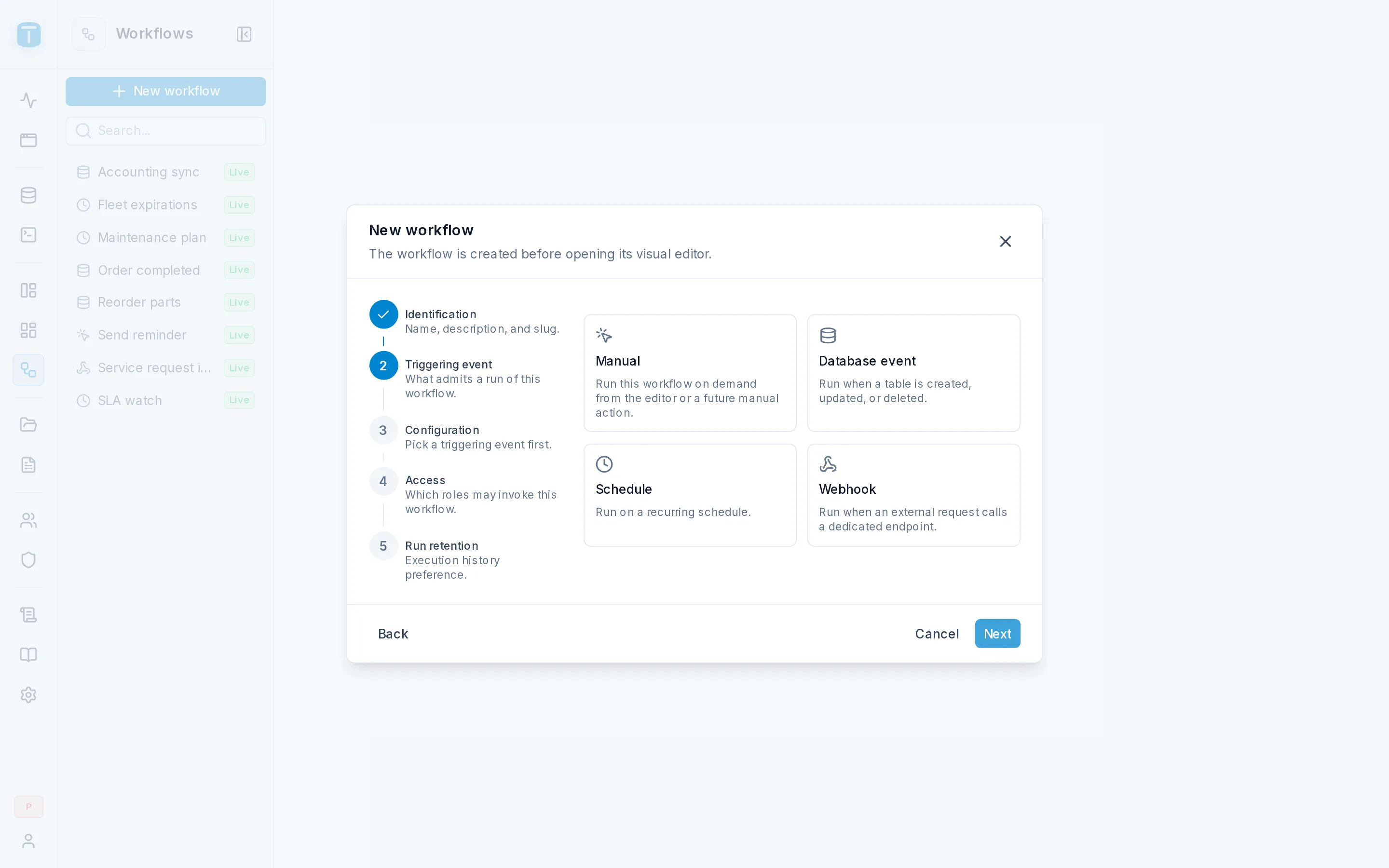
A step you've reached can be opened again from the rail on the left. Next waits until the step is complete.
Identification
| Field | |
|---|---|
| Name | Required, up to 32 characters, unique. Order completed |
| Description | Optional, up to 128 characters |
| Slug | Required, proposed from the name until you edit it, unique, up to 32 characters. It's the workflow's address in the HTTP routes: /api/workflows/order-completed/run |
Triggering event
Pick one of four cards:
| Card | Runs |
|---|---|
| Manual | on demand: from the editor, a DataView action, a page of the App or the API |
| Database event | when rows of a table are created, updated or deleted |
| Schedule | on a recurring schedule |
| Webhook | when an external request calls the workflow's endpoint |
For Acme's workflow, pick Database event. The trigger can be changed later in Settings › Trigger.
Configuration
The chosen trigger's own fields. The step is titled after the trigger, and required fields must be filled to continue:
| Trigger | Required here | Details |
|---|---|---|
| Manual | nothing | Manual |
| Database event | Table, Events, Execute as | Database event |
| Schedule | a valid schedule, Time zone, Execute as | Schedule |
| Webhook | Wait time when Synchronous; Execute as when Public | Webhook |
For Order completed: Table work_orders, Events Update, Filter {"status": {"_eq": "COMPLETED"}}, and Execute as left on the proposed Workflows system account.
Access
Roles that may invoke this workflow: a switch per role. Administrators can always invoke any workflow; with no role switched on, only they can.
It matters for workflows someone starts: Manual, Schedule (when started on demand) and Authenticated webhooks. A database event never checks it. Order completed needs no roles. See Settings › Security.
Run retention
| Field | |
|---|---|
| Execution history | Keep execution history, on by default. Off, a run is kept only 24 hours after it finishes |
| History level | DETAILED by default here: each step's input and result are kept, which is what you need while building. SUMMARY keeps only which steps ran, their outcome and errors |
See Settings › General for how long each level is kept.
The last step says Creating never activates this workflow: publish it from the editor once its design is ready, then enable it.
create_workflow with the trigger, save_workflow with the steps, tries it with run_workflow in test mode, and publishes it with publish_workflow. See Recipes › A workflow.What the wizard creates
- The workflow, disabled and never published, with one Start step holding the trigger you configured.
- Its invoke grants, for the roles you switched on. They apply at once, but a workflow can't be started on demand until it's published and enabled.
- Its history policy, as you set it.
If creating fails, such as a name or slug already taken, the wizard stays open with your values.
Errors
| Code | When |
|---|---|
WORKFLOW_NAME_CONFLICT, WORKFLOW_SLUG_CONFLICT (409) | another workflow already has the name or the slug |
WORKFLOW_INVALID_DESIGN (400) | the trigger's configuration can't be valid, such as a database event on a view |
See Errors.
Without the wizard
The wizard sends POST /admin/api/workflows with the name, description, slug, history settings and the Start's configuration, then PUT /admin/api/workflows/{id}/roles with the roles. Agents use the MCP tool create_workflow. See Admin API.
Next steps
- The editor: add the steps.
- Triggers: each trigger's configuration in detail.