

Permissions
A permission, also called a grant, says what one role may do with one resource. It has up to four parts:
- an action and its effect:
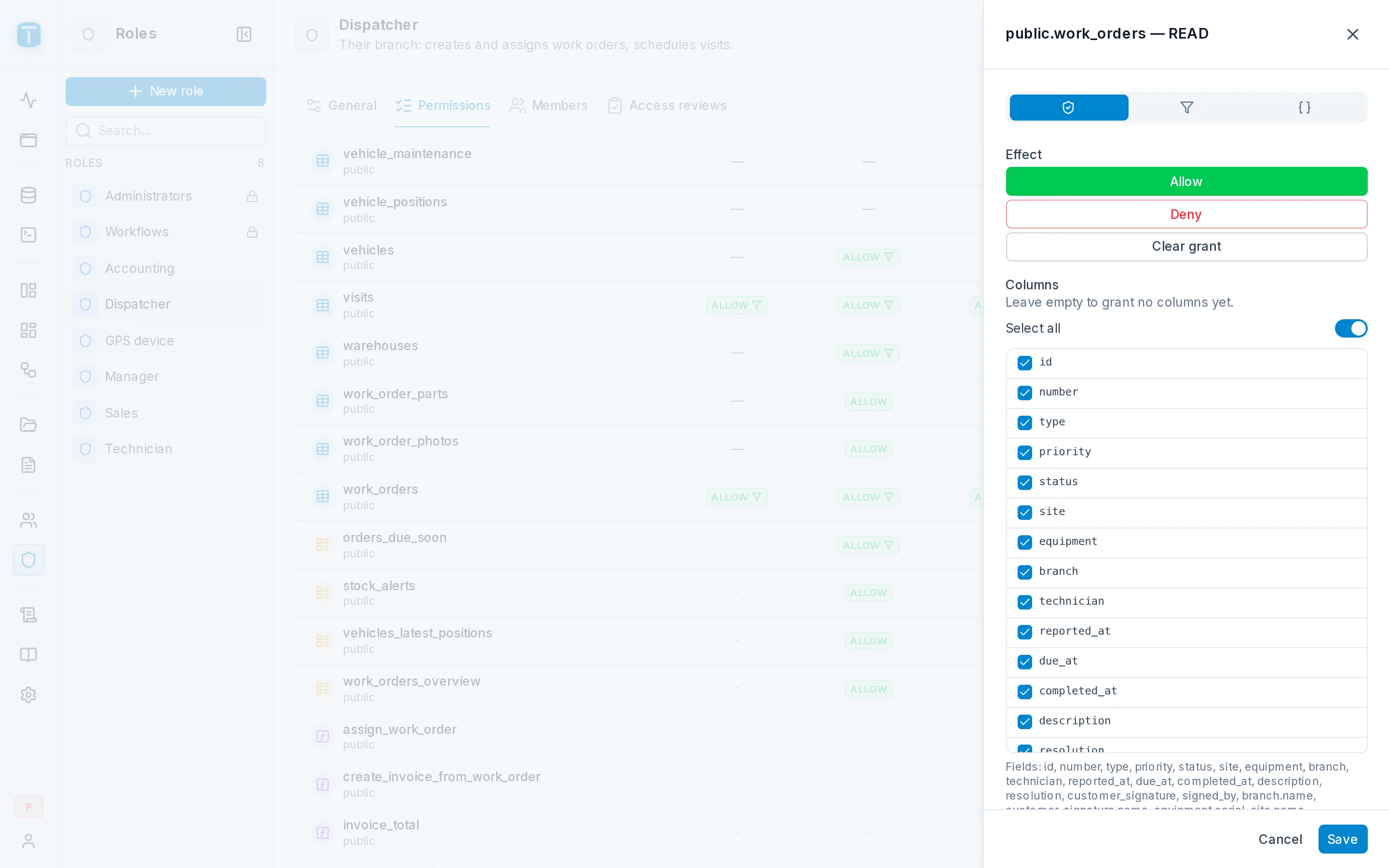
READonwork_orders,ALLOWorDENY; - the fields the role may use;
- a row filter: which rows the role may act on;
- payload checks: rules the values written must meet (create and update only).
The same model is used everywhere: Data API reads and writes, relations, the generated OpenAPI, the App, and workflows. It is enforced by one resolver, and in the end by PostgreSQL.
Actions
| Resource | Actions |
|---|---|
| Table | CREATE, READ, UPDATE, DELETE |
| View | READ |
| Function | EXECUTE |
Deny by default, and any DENY wins
For each resource and action, TotalBase looks at the grants of all of the caller's active roles:
any DENY             →  denied
no DENY, any ALLOW   →  allowed
no grant at all      →  denied
If nothing allows an action, it is denied. A user with no roles can do nothing. An explicit DENY wins over any ALLOW from another role, so you can use it to block one action for one role whatever else that person holds.
Fields
When an action is allowed, each field is decided the same way, DENY over ALLOW over nothing. Every field must be granted explicitly. There is no "all columns" option, so a column added to a table later stays invisible until someone grants it.
A read without fields returns exactly the columns the caller may read. Naming a column the caller may not use is 403 FIELD_PERMISSION_DENIED. A column that doesn't exist gets the same answer, so a role can't find out which columns are hidden from it.
Relations are fields too. If Dispatchers may read site.customer.name on work_orders, that path must be granted on the work_orders grant itself. Granting site doesn't include it, and neither does a grant on customers. What a relation exposes is decided by the resource being read, path by path.
Row filters
A row filter limits a grant to some rows. It is written in the same filter syntax as a request's where. Acme's grants on work_orders:
| Role | Row filter on READ and UPDATE |
|---|---|
| Dispatcher | { "branch": { "_eq": "$USER.branch" } } |
| Technician | { "technician.user": { "_eq": "$USER.id" } } |
| Manager | none: every row |
$USER.* is read from the caller's current user row on every request. Move a dispatcher to another branch and they see the other branch's orders on their next request.
The rules for combining filters:
- Across roles, filters combine with OR. A Dispatcher who is also a Technician sees their branch's orders and the orders assigned to them. An ALLOW without a filter means every row.
- A request's own
wherecombines with AND. A request can narrow what a role sees, never widen it. - PostgreSQL evaluates the filter as part of the query. Rows outside it are never read or touched, and reading one by key returns
404.
Writes check the row before and after
| Action | Checked against |
|---|---|
CREATE | the new row |
UPDATE | the row before and the row after |
DELETE | the row before |
Checking both sides of an update matters. A Salta dispatcher may update Salta's orders, so the row before passes. If they try to move an order to the Jujuy branch, the row after fails the same filter, the update is refused with 403 ACTION_DENIED, and the transaction rolls back. The check is evaluated by PostgreSQL on the real resulting row, inside the same statement, so triggers and defaults are already applied when it runs.
Payload checks
A payload check is a rule about the values a role writes, for rules that apply to one role and not to another, so they can't be a CHECK constraint. Acme has two:
- Discount cap: Sales and Dispatchers may write quote items only with
{ "discount_pct": { "_lte": "20" } }. Managers have no such check. - Closing an order: a Technician may set an order to
COMPLETEDonly with a resolution and the customer's signature:
{ "_or": [
  { "status": { "_neq": "COMPLETED" } },
  { "_and": [ { "resolution": { "_nnull": true } },
              { "customer_signature": { "_nnull": true } } ] }
] }
Every check from every grant must pass (AND). A failure is 422 PAYLOAD_CHECK_FAILED with the check's label as the message.
CHECK constraint or a trigger.Permissions apply immediately
Grants, roles and assignments are read from PostgreSQL on every request. Nothing about authorization is cached in a session or a token, so a change applies on the next request.
Setting permissions
In the admin, open Roles, choose a role and its Permissions section: a matrix of resources by actions. Click a cell to edit that grant: its effect and fields, its row filter, its payload checks. A user's Permissions section shows the combined result of all their roles, and which role contributes each part.
Next steps
- Granting permissions: the matrix step by step.
- Row filters and Payload checks.
- Object access: who may open a DataView or dashboard. This is a separate layer that grants no data.