

SQL Conventions
In the admin: a Dashboard › a widget › Edit
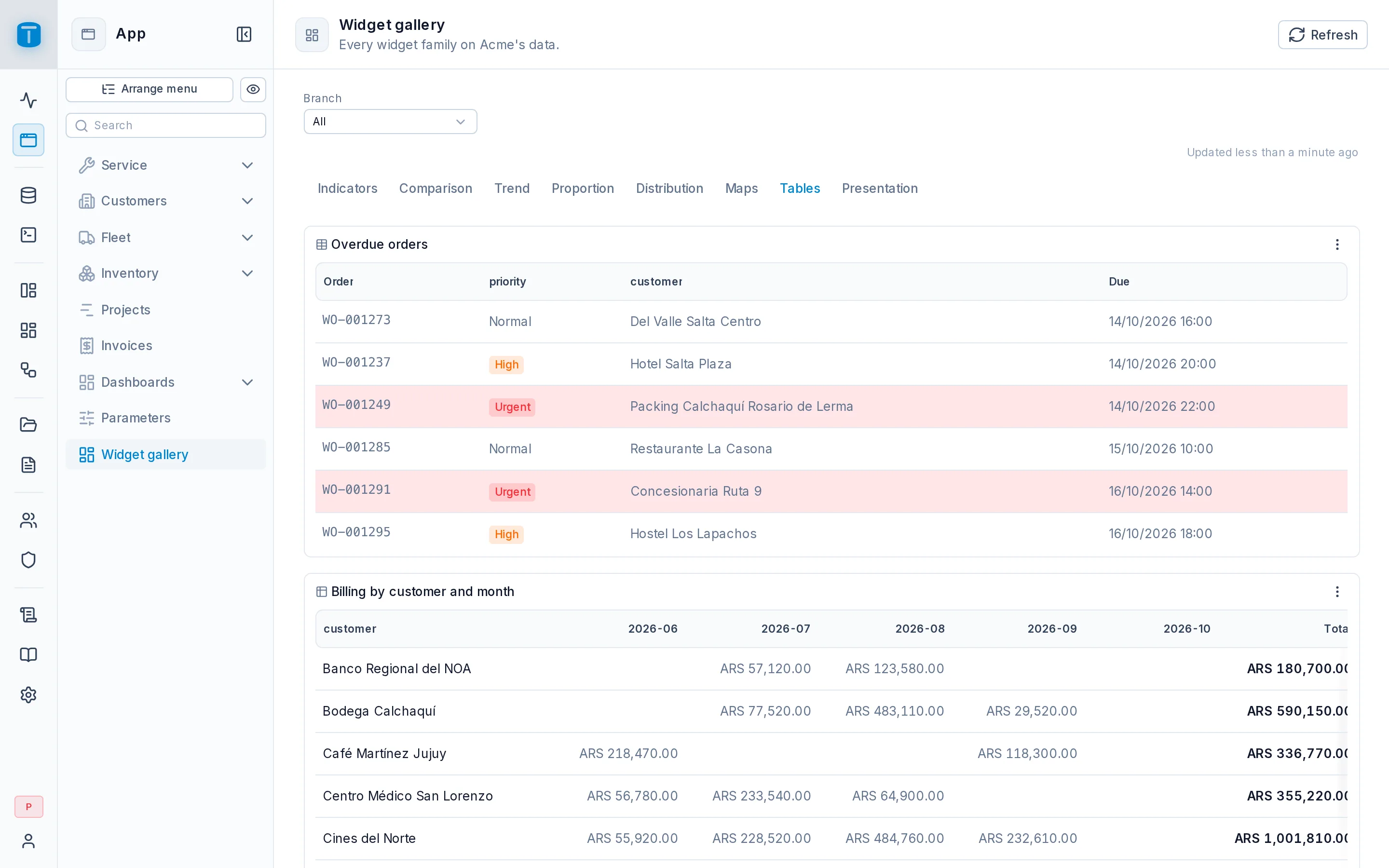
Presentation that depends on the data, such as an overdue row in red, is written in the query, as extra columns with agreed names. There are no rule builders or conditional formatting screens: a CASE in SQL does the job, and PostgreSQL computes it.
Metadata columns: the _ prefix
A result column whose name starts with _ is a metadata column. It travels with the row but is never displayed as data, and no role ever picks it on its own. The prefix is reserved so a helper can't collide with a real column: status_color could be one, _status_color can't.
| Column | Meaning |
|---|---|
_color | the row's color |
_<column>_color | in a Table, shows <column> as colored badges |
any other _* | a free helper: an order key (_step), a key for a click (_id). Never shown |
A click's formulas can read them: Open a record with {{row._id}} opens the clicked row's record.
Row color: _color
Where a row is one mark, _color colors it. A widget's Color column setting can name another column instead.
| Widget | What _color colors |
|---|---|
| Table | the row's background tint |
| Map | the point |
| Leaderboard | the bar |
| Pie, Donut, Funnel | the slice or step |
| Treemap, Sunburst | a leaf: the innermost rectangle or the outer ring's segment |
| Bar chart, Horizontal bar | the bar, only with a single value column. With several series a row is a group |
| Line, Area, KPI, Gauge | doesn't apply: a line has one color |
A Table also hides its Color column, even when its name has no _.
Badges: _<column>_color
In a Table, when the result has _<column>_color beside <column>, each cell of that column shows as a badge in the row's color:
SELECT wo.number, wo.status, wo.priority,
       CASE wo.status
         WHEN 'COMPLETED' THEN 'emerald'
         WHEN 'WAITING_PARTS' THEN 'amber'
         WHEN 'CANCELLED' THEN 'neutral'
       END AS _status_color,
       CASE WHEN wo.due_at < now() THEN 'red' END AS _color
FROM work_orders wo
ORDER BY wo.reported_at DESC
LIMIT 50
A NULL or a value that isn't a palette color leaves the cell as plain text.
The palette, and why it's safe
The valid colors are the palette's names, the same as roles and menu entries use:
red, orange, amber, yellow, lime, green, emerald, teal, cyan, sky, blue, indigo, violet, purple, fuchsia, pink, rose.
- A color from SQL is data, not styling. Only these names pass; a hex code, a CSS value or a typo is ignored and the widget falls back to its Color, or the theme's primary.
- The shade adapts to light and dark mode.
- In the example above,
'neutral'isn't in the palette, so a cancelled order's status reads as plain text.
CHECK list set in Database (Urgent in red) already color a pie's slices and a chart's series. Use _color when the color depends on more than one value.Other conventions
- Order and
LIMITbelong in the query. Widgets never re-sort or cut rows. The only exception is a Table's header sort, over the rows already loaded. - Time series go oldest first. A KPI's trend, a Line and an Area read the last row as "now".
- Optional filters use
($VAR.x IS NULL OR column = $VAR.x): no value, no filter. The drawer's Optional filter writes it for you. - Per-user rows use
$USER.<column>:WHERE branch = $USER.branch. A$VARfilters; only$USERrestricts. - Locations are a
point:point(lng, lat)builds one. - Slow aggregates over a large table belong in a materialized view refreshed on a schedule by a workflow, not a longer timeout.